In vSphere 6.0 the command line interface esxcli has been extended by the new features. This post introduces the new and extended namespaces. Remarkable changes in esxcli version 6.0.0 are:
- Local user management with the system.account namespace
- Certificate Store management with the system.security.certificatestore namespace
- Virtual Volumes management with the storage.vvol namespace
- Remote direct memory access management with the rdma namespace
- The network.fence namespace has been removed
- The network.vswitch.dvs.vmware.vxlan namespace has been removed
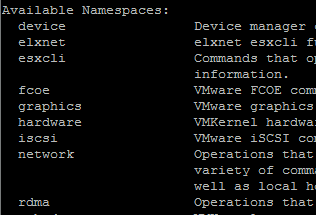
- esxcli device
- esxcli elxnet
- esxcli hardware smartcard
- esxcli iscsi networkportal ipv6config
- esxcli network nic
- esxcli rdma
- esxcli storage
- esxcli system
- esxcli vsan
esxcli device
Usage: esxcli  device add [cmd options]
Description:
  add                   Add a device to enable a software device driver.

Cmd options:
  -d|--device-identifier=<str>
                        Device identifier from the device specification for
                        the software device driver. Valid input is in reverse
                        domain name format (e.g. com.company.device).
                        (required)
  -i|--instance-address=<long>
                        Unique number to address this instance of the device,
                        if multiple instances of the same device identifier
                        are added. Valid values are integer in the range 0-31.
                        Default is 0.
esxcli elxnet
Usage: esxcli elxnet dbgmask get [cmd options]
Description:
  get                   Gets Debug Mask of an elxnet nic

Cmd options:
  -p|--pcidevname=<str> PCI SBDF address for an elxnet NIC. The address can be
                        found in the "PCI Device" column of the `esxcli
                        network nic list' command. (required)


Usage: esxcli elxnet dbgmask set [cmd options]
Description:
  set                   Sets Debug Mask of an elxnet nic

Cmd options:
  -m|--mask=<str>       DebugMask value in 8 digit Hex (Ex: 0x00000101),
                        DRIVER: 0x1, UPLINK: 0x2, QUEUE: 0x4, INTR: 0x8, MCC:
                        0x10, TX: 0x20, RX: 0x40, MGMT: 0x80, WORKER: 0x100,
                        SRIOV: 0x200, EVENT: 0x400, VLAN: 0x800, VXLAN: 0x1000
                        (required)
  -p|--pcidevname=<str> PCI SBDF address for an elxnet NIC. The address can be
                        found in the "PCI Device" column of the `esxcli
                        network nic list' command. (required)


Usage: esxcli elxnet regdump get [cmd options]
Description:
  get                   Gets regdump (FAT dump) of an elxnet nic

Cmd options:
  -f|--filepath=<str>   Absolute file path (must begin with "/") to copy
                        register dump. File will be generated on the target
                        ESXi machine in case of remote esxcli invocations.
                        (required)
  -p|--pcidevname=<str> PCI SBDF address for an elxnet NIC. The address can be
                        found in the "PCI Device" column of the `esxcli
                        network nic list' command. (required)


Usage: esxcli elxnet stats get [cmd options]
Description:
  get                   Displays private stats of an elxnet nic

Cmd options:
  -p|--pcidevname=<str> PCI SBDF address for an elxnet NIC. The address can be
                        found in the "PCI Device" column of the `esxcli
                        network nic list' command. (required)


Usage: esxcli elxnet vib get [cmd options]
Description:
  get                   Displays the name of the VIB that provided this esxcli
                        plugin

Cmd options:
esxcli hardware smartcard
Usage: esxcli hardware smartcard certificate list [cmd options]
Description:
  list                  Certificates from inserted smart cards.

Cmd options:
  -s|--slot=<long>      List certificates from only the token in the given
                        slot.


Usage: esxcli hardware smartcard info get [cmd options]
Description:
  get                   Information about the smart card subsystem.

Cmd options:


Usage: esxcli hardware smartcard slot list [cmd options]
Description:
  list                  Information about connected smart card readers.

Cmd options:


Usage: esxcli hardware smartcard token list [cmd options]
Description:
  list                  Information about inserted smart cards.

Cmd options:
  -s|--slot=<long>      List tokens only for the given slot.
esxcli iscsi networkportal ipv6config
Usage: esxcli iscsi networkportal ipv6config address add [cmd options]
Description:
  add                   Add IPv6 addresses to the given iSCSI network portal.

Cmd options:
  -A|--adapter=<str>    The iSCSI adapter name. (required)
  -a|--address-list=[ <str> ... ]
                        An IPv6 address to add in X:X:X::/X format. Multiple
                        addresses can be provided using format -a address1 -a
                        address2 -a address3.
  -r|--remove-all-existing
                        Remove all existing routable IPv6 addresses before
                        adding the addresses specified by --address-list. If
                        this flag is passed and --address-list is empty, all
                        existing routable addresses are removed.


Usage: esxcli iscsi networkportal ipv6config address list [cmd options]
Description:
  list                  List the IPv6 addresses assigned to the iSCSI network
                        portal.

Cmd options:
  -A|--adapter=<str>    The iSCSI adapter name. (required)


Usage: esxcli iscsi networkportal ipv6config address remove [cmd options]
Description:
  remove                Remove IPv6 addresses from the given iSCSI network
                        portal.

Cmd options:
  -A|--adapter=<str>    The iSCSI adapter name. (required)
  -a|--address-list=[ <str> ... ]
                        An IPv6 address to remove in X:X:X::/X format.
                        Multiple addresses can be provided using format -a
                        address1 -a address2 -a address3. (required)


Usage: esxcli iscsi networkportal ipv6config get [cmd options]
Description:
  get                   Get iSCSI network portal ipv6 configuration

Cmd options:
  -A|--adapter=<str>    The iSCSI adapter name. (required)


Usage: esxcli iscsi networkportal ipv6config set [cmd options]
Description:
  set                   Set iSCSI network portal IPv6 configuration.

Cmd options:
  -A|--adapter=<str>    The iSCSI adapter name. (required)
  -e|--enable           Enable/Disable IPv6
  -d|--enable-dhcpv6    Enable/Disable IPv6 configuration using DHCPv6
  -l|--enable-linklocal-autoconfiguration
                        Enable/Disable auto configuration of linklocal address
  -r|--enable-router-advertisement
                        Enable/Disable IPv6 configuration using Router
                        Advertisement
  -g|--gateway6=<str>   The iSCSI network portal IPv6 gateway address
esxcli network nic
Usage: esxcli network nic pauseParams list [cmd options]
Description:
  list                  List pause parameters of all NICs

Cmd options:
  -n|--nic-name=<str>   The name of the NIC whose pause parameters should be
                        retrieved.


Usage: esxcli network nic pauseParams set [cmd options]
Description:
  set                   Set pause parameters for a NIC

Cmd options:
  -a|--auto             Enable/disable auto negotiation.
  -n|--nic-name=<str>   Name of NIC whose pause parameters should be set.
                        (required)
  -r|--rx               Enable/disable pause RX flow control.
  -t|--tx               Enable/disable pause TX flow control.


Usage: esxcli network nic ring current get [cmd options]
Description:
  get                   Get current RX/TX ring buffer parameters of a NIC

Cmd options:
  -n|--nic-name=<str>   The name of the NIC whose current RX/TX ring buffer
                        parameters should be retrieved. (required)


Usage: esxcli network nic ring current set [cmd options]
Description:
  set                   Set current RX/TX ring buffer parameters of a NIC

Cmd options:
  -n|--nic-name=<str>   The name of the NIC whose current RX/TX ring buffer
                        parameters should be set. (required)
  -r|--rx=<long>        Number of ring entries for the RX ring.
  -j|--rx-jumbo=<long>  Number of ring entries for the RX jumbo ring.
  -m|--rx-mini=<long>   Number of ring entries for the RX mini ring.
  -t|--tx=<long>        Number of ring entries for the TX ring.


Usage: esxcli network nic ring preset get [cmd options]
Description:
  get                   Get preset RX/TX ring buffer parameters of a NIC

Cmd options:
  -n|--nic-name=<str>   The name of the NIC whose preset RX/TX ring buffer
                        parameters should be retrieved. (required)


Usage: esxcli network nic software list [cmd options]
Description:
  list                  List software simulation settings of all physical NICs
                        currently installed and loaded on the system.

Cmd options:


Usage: esxcli network nic software set [cmd options]
Description:
  set                   Enable and disable software simulation settings on a
                        NIC.

Cmd options:
  --geneveoffload       Configure Geneve encapsulation offload software
                        simulation.
  --highdma             Configure high DMA software simulation.
  --ipv4cso             Configure IPv4 checksum offload software simulation.
  --ipv4tso             Configure IPv4 TCP segmentation offload software
                        simulation.
  --ipv6cso             Configure IPv6 checksum offload software simulation.
  --ipv6csoext          Configure IPv6 extend header checksum offload software
                        simulation.
  --ipv6tso             Configure IPv6 TCP segmentation offload software
                        simulation.
  --ipv6tsoext          Configure IPv6 extend header TCP segmentation offload
                        software simulation.
  --obo                 Configure offset based encapsulation offload software
                        simulation.
  --sg                  Configure scatter gather software simulation.
  --sgsp                Configure scatter gather span multiple pages software
                        simulation.
  --tagging             Configure TX VLAN tagging software simulation.
  --untagging           Configure RX VLAN untagging software simulation.
  -n|--vmnic=<str>      Name of the vmnic whose software similation settings
                        should be updated. (required)
  --vxlanencap          Configure VXLAN encapsulation offload software
                        simulation.
esxcli rdma
Usage: esxcli rdma device list [cmd options]
Description:
  list                  List the logical RDMA devices currently registered on
                        the system.

Cmd options:


Usage: esxcli rdma device stats get [cmd options]
Description:
  get                   Get statistics for a given RDMA device.

Cmd options:
  -d|--device=<str>     Name of the RDMA device. (required)


Usage: esxcli rdma device vmknic list [cmd options]
Description:
  list                  List the vmknics associated with RDMA devices.

Cmd options:
  -d|--device=<str>     Name of the RDMA device whose vmknics to display.
esxcli storage
Usage: esxcli storage core device physical get [cmd options]
Description:
  get                   Get information about a physical storage device.

Cmd options:
  -d|--device=<str>     Specify a device name. (required)


Usage: esxcli storage core device raid list [cmd options]
Description:
  list                  List the physical devices that compose a given logical
                        device.

Cmd options:
  -d|--device=<str>     Specify a device name. (required)


Usage: esxcli storage nfs41 add [cmd options]
Description:
  add                   Add a new NFS v4.1 volume to the ESX Host and mount it
                        with the given volume name.

Cmd options:
  -H|--hosts=[ <str> ... ]
                        The hostname(s) or IP address(es) (comma-separated) of
                        the server for the NFS v4.1 volume to add and mount on
                        the system. (required)
  -r|--readonly         If set, this flag will make the mount point be read-
                        only.
  -a|--sec=<str>        Security flavors. Acceptable values are:  [AUTH_SYS,
                        SEC_KRB5].
  -s|--share=<str>      The share name on the remote system to use for this
                        NFS v4.1 mount point. (required)
  -v|--volume-name=<str>
                        The volume name to use for the NFS v4.1 mount.  This
                        must be a unique volume name and cannot conflict with
                        existing NAS, NFS v4.1, VMFS, or other volume names.
                        (required)


Usage: esxcli storage nfs41 list [cmd options]
Description:
  list                  List the NFS v4.1 volumes currently known to the ESX
                        host.

Cmd options:
  -p|--pe-only          Filter the output to only show VVol PE Volumes


Usage: esxcli storage nfs41 param get [cmd options]

Description:
  get                   Get the volume parameters of the NFS v4.1 volumes.

Cmd options:
  -v|--volume-name=<str>
                        NFS v4.1 volume name("all" to list all). (required)


Usage: esxcli storage nfs41 param set [cmd options]
Description:
  set                   Set the volume parameters of the NFS v4.1 volumes.

Cmd options:
  -q|--maxqueuedepth=<long>
                        The maximum queue depth for the NFS v4.1 volume.
  -v|--volume-name=<str>
                        The NFS v4.1 volume name. (required)


Usage: esxcli storage nfs41 remove [cmd options]
Description:
  remove                Remove an existing NFS v4.1 volume from the ESX host.

Cmd options:
  -v|--volume-name=<str>
                        The volume name of the NFS v4.1 volume to remove from
                        the ESX host. (required)


Usage: esxcli storage vmfs lockmode list [cmd options]
Description:
  list                  List the on-disk critical section locking mode for
                        VMFS volumes available on this host.

Cmd options:
  -i|--ignore-errors    Ignore errors encountered (if any) while retrieving
                        information for each file system.
  -l|--volume-label=[ <str> ... ]
                        The label of the target VMFS volume.
  -u|--volume-uuid=[ <str> ... ]
                        The uuid of the target VMFS volume.

Examples:

  Show lockmodes for all VMFS volumes.
# esxcli storage vmfs lockmode list

  Show lockmode for VMFS volume with label 'datastore1'.
# esxcli storage vmfs lockmode list -l datastore1

  Show lockmodes for VMFS volume with label 'datastore1' and VMFS volume with label 'datastore2'.
# esxcli storage vmfs lockmode list -l datastore1 -l datastore2

  Show lockmodes for VMFS volume with label 'datastore1' and VMFS volume with uuid '50ac1b12-6b9eebe0-6765-80c16e6d3408'.
# esxcli storage vmfs lockmode list -l datastore1 -u 50ac1b12-6b9eebe0-6765-80c16e6d3408


Usage: esxcli storage vmfs lockmode set [cmd options]
Description:
  set                   Update the on-disk critical section locking mode for a
                        particular VMFS Volume.

Cmd options:
  -a|--ats              Enable ATS-only locking.
  -s|--scsi             Enable SCSI locking.
  -l|--volume-label=<str>
                        The label of the target VMFS volume.
  -u|--volume-uuid=<str>
                        The uuid of the target VMFS volume.

Examples:

  Configure VMFS volume with label 'datastore1'for ATS-only locking.
# esxcli storage vmfs lockmode set -a -l datastore1

  Configure VMFS volume with uuid '50ac1b12-6b9eebe0-6765-80c16e6d3408' for SCSI locking.
# esxcli storage vmfs lockmode set -s -u 50ac1b12-6b9eebe0-6765-80c16e6d3408


Usage: esxcli storage vmfs pbcache get [cmd options]
Description:
  get                   Get VMFS Pointer Block cache statistics.

Cmd options:


Usage: esxcli storage vmfs pbcache reset [cmd options]
Description:
  reset                 Reset the VMFS Pointer Block cache statistics.

Cmd options:


Usage: esxcli storage vvol daemon unbindall [cmd options]
Description:
  unbindall             Unbind all virtual Volumes from all VPs known to the
                        ESX host.

Cmd options:


Usage: esxcli storage vvol protocolendpoint list [cmd options]
Description:
  list                  List the VVol Protocol EndPoints currently known to
                        the ESX host.

Cmd options:
  -p|--pe=<str>         This shows PE information associated with given vasa
                        pe id


Usage: esxcli storage vvol storagecontainer list [cmd options]
Description:
  list                  List the VVol StorageContainers currently known to the
                        ESX host.

Cmd options:


Usage: esxcli storage vvol vasacontext get [cmd options]
Description:
  get                   Get the VVol VASA Context (VC UUID).

Cmd options:


Usage: esxcli storage vvol vasaprovider list [cmd options]
Description:
  list                  List the VASA Providers registered on the host.

Cmd options:
Usage: esxcli storage vmfs host {cmd} [cmd options]

Available Commands:
  list                  List hosts accessing a particular VMFS Volume.
[root@esx1:~] esxcli storage vmfs host list --help
Usage: esxcli storage vmfs host list [cmd options]

Description:
  list                  List hosts accessing a particular VMFS Volume.

Cmd options:
  -v|--liveness=<str>   The type of liveness check to perform on the VMFS volume. Valid values are  [none, quick]
                        (default is none).
  -l|--volume-label=<str>
                        The label of the target VMFS volume.
  -u|--volume-uuid=<str>
                        The uuid of the target VMFS volume.

Examples:

  List hosts using volume 'datastore1' with default liveness check of 'none'.
# esxcli storage vmfs host list -l datastore1

  List hosts using volume 'datastore1' with liveness check of 'quick'.
# esxcli storage vmfs host list -l datastore1 -v quick
esxcli system
Usage: esxcli system account add [cmd options]
Description:
  add                   Create a new local user account.

Cmd options:
  -d|--description=<str>
                        User description, e.g. full name.
  -i|--id=<str>         User ID, e.g. "administrator". (required)
  -p|--password=<str>   User password. (secret)
  -c|--password-confirmation=<str>
                        Password confirmation. Required if password is
                        specified. (secret)


Usage: esxcli system account list [cmd options]
Description:
  list                  List local user accounts.

Cmd options:


Usage: esxcli system account remove [cmd options]
Description:
  remove                Remove an existing local user account.

Cmd options:
  -i|--id=<str>         ID of user to be removed. (required)


Usage: esxcli system account set [cmd options]
Description:
  set                   Modify an existing local user account.

Cmd options:
  -d|--description=<str>
                        User description, e.g. full name.
  -i|--id=<str>         User ID, e.g. "administrator". (required)
  -p|--password=<str>   User password. (secret)
  -c|--password-confirmation=<str>
                        Password confirmation. Required if password is
                        specified. (secret)


Usage: esxcli system module parameters copy [cmd options]
Description:
  copy                  Copy the load time parameters from one VMkernel module
                        to another.

Cmd options:
  -f|--force            Skip VMkernel module validity checks for the source
                        VMkernel module.
  -p|--parameter-keys=[ <str> ... ]
                        Parameter key that should get copied. (required)
  -s|--source=<str>     The name of the source VMkernel module. (required)
  -t|--target=<str>     The name of the target VMkernel module. (required)


Usage: esxcli system permission list [cmd options]
Description:
  list                  List permissions defined on the host.

Cmd options:


Usage: esxcli system permission set [cmd options]
Description:
  set                   Set permission for a user or group.

Cmd options:
  -g|--group            Specifies that the supplied ID refers to a group. ESXi
                        local groups are not supported.
  -i|--id=<str>         ID of user or group. Domain users or groups should be
                        specified as "DOMAIN\user_name" or
                        "DOMAIN\group_name". (required)
  -r|--role=<str>       Name of role that specifies user access rights.
                            Admin: Full access rights
                            NoAccess: Used for restricting granted access.
                        E.g. to deny access for some user whose group already
                        has access.
                            ReadOnly: See details of objects, but not make
                        changes
                         (required)


Usage: esxcli system permission unset [cmd options]
Description:
  unset                 Remove permission for a user or group.

Cmd options:
  -g|--group            Specifies that the supplied ID refers to a group.
  -i|--id=<str>         ID of user or group. (required)


Usage: esxcli system security certificatestore add [cmd options]
Description:
  add                   Add a new CA certificate to the CA certificate store.

Cmd options:
  -f|--filename=<str>   Path to certificate file in PEM format (required)


Usage: esxcli system security certificatestore list [cmd options]
Description:
  list                  List all certificates in the CA certificate store.

Cmd options:


Usage: esxcli system security certificatestore remove [cmd options]
Description:
  remove                Remove a certificate from the CA certificate store.

Cmd options:
  -i|--issuer=<str>     Remove certificate by the specified issuer (required)
  -s|--serial=<str>     Remove certificate of specified serial number
                        (required)


Usage: esxcli system slp search [cmd options]
Description:
  search                Perform SLP search for neighboring services

Cmd options:
  -n|--node=<str>       Optional, host FQDN or IP address to connect to. Use
                        -P to control protocol used.
  -p|--port=<long>      Optional, override the default port value 427.
  -P|--protocol=<str>   Optional, override unicast protocol:  [tcp, udp],
                        default tcp, requires -n.
  -s|--service=<str>    Optional, the service name to search for. Defaults to
                        'service-agent'.


Usage: esxcli system slp stats get [cmd options]
Description:
  get                   Report operational state of Service Location Protocol
                        Daemon

Cmd options:
esxcli vsan
Usage: esxcli vsan cluster new [cmd options]
Description:
  new                   Create a VSAN cluster with current host joined, a
                        random sub-cluster UUID will be generated.

Cmd options:


Usage: esxcli vsan faultdomain get [cmd options]
Description:
  get                   Get the fault domain name for this host.

Cmd options:


Usage: esxcli vsan faultdomain reset [cmd options]

Description:
  reset                 Reset Host fault domain to default value

Cmd options:


Usage: esxcli vsan faultdomain set [cmd options]
Description:
  set                   Set the fault domain for this host

Cmd options:
  --fdname=<str>        Fault domain name to use for this host. Empty string
                        means reset to default. (required)


Usage: esxcli vsan storage checksum get [cmd options]
Description:
  get                   Get status of checksum protection.

Cmd options:


Usage: esxcli vsan storage checksum set [cmd options]
Description:
  set                   Configure storage checksum protection.

Cmd options:
  --enabled             Enable or disable storage checksum protection. When
                        enabled protection metadata will be written for every
                        512-bytes of target sector data. (required)


Usage: esxcli vsan storage diskgroup mount [cmd options]
Description:
  mount                 Mount a VSAN disk group.

Cmd options:
  -s|--ssd=<str>        Specify a disk group's fronting ssd to mount the ssd
                        and each backing hdd for use by VSAN.e.g.:
                        mpx.vmhba2:C0:T1:L0
  -u|--uuid=<str>       Specify a VSAN UUID of fronting ssd to mount the ssd
                        and each backing hdd for use by VSAN.e.g.:
                        mpx.vmhba2:C0:T1:L0

Usage: esxcli vsan storage diskgroup unmount [cmd options]
Description:
  unmount               Unmount VSAN disk group.

Cmd options:
  -s|--ssd=<str>        Specify a disk group's fronting ssd to unmount the ssd
                        and each backing hdd from VSAN usage.e.g.:
                        mpx.vmhba2:C0:T1:L0 (required)


Usage: esxcli vsan storage tag add [cmd options]

Description:
  add                   Add a VSAN storage tag.

Cmd options:
  -d|--disk=<str>       Name of the disk to which the tag should be added. (required)
  -t|--tag=<str>        Tag to be added to disk. Supported tags are  [capacityFlash]. (required)


Usage: esxcli vsan storage tag remove [cmd options]

Description:
  remove                Remove a VSAN storage tag.

Cmd options:
  -d|--disk=<str>       Name of the disk from which the tag should be removed. (required)
  -t|--tag=<str>        Tag to be removed from disk. Supported tags are  [capacityFlash]. (required)